
What makes membership site hosting different
Conventional hosting comparison guides focus on storage space, bandwidth, and price. For membership sites, those numbers don’t tell you much.
A membership website restricts some or all of its content to registered users, typically in exchange for a subscription fee or sign-up. Think of online course platforms, professional communities, news sites with paywalls, or software documentation portals — any site where logging in unlocks something the public can’t see.
That has real consequences for hosting. A conventional website serves the same pages to everyone; a membership site has to track who each visitor is, what they’re allowed to see, and serve them something different. Every page load does more work: more database queries, more dynamic content, less that can be cached. The hosting platform has to be built for that.
Database performance tuned for CMS patterns
One thing we learned early building freistilbox: MySQL’s default configuration is not set up for Drupal or WordPress. Both CMSes have complex schemas and generate a lot of queries — a single page render can easily trigger dozens, sometimes hundreds. Membership plugins add more, because now every query also needs to check whether this visitor has access.
Hardware matters here, and not in the way most hosting plans advertise. Plans that lead with “50 GB database storage!” are measuring the wrong thing. Storage volume is rarely the constraint; storage speed is. We’ve used solid state drives since before that was standard, and our database servers carry enough RAM to keep frequently accessed data in memory. Even the fastest NVMe drive is slower than RAM — so the more that fits in the buffer pool, the fewer disk reads happen.
Getting the most out of that hardware takes careful configuration. MySQL has a lot of performance knobs, and setting them well requires knowing what kind of workload you’re tuning for. Because we only host Drupal and WordPress, we know that workload well.
Smart page caching that respects authentication
With a conventional website, logged-in users are a small minority — usually a handful of editors. A content cache can store almost every page the application renders, and serve it directly for repeat requests, which can speed up delivery by orders of magnitude.
Membership websites flip that ratio. Most visitors have accounts and have to log in to reach their content. Even if a page only differs by a username in the top corner, the session cookie is there, and many hosting platforms will refuse to cache anything once they detect it. The result: every page load hits the application, every time.
freistilbox handles this differently, based on a set of rules we’ve built over the years. Static pages, CSS, JavaScript, images, and PDFs always go through the cache. Known cookies unrelated to a visitor session, such as those for analytics or consent banners, don’t prevent caching either. Only requests that genuinely require the application to respond bypass the cache. Our web operations experts maintain and update those rules as CMS versions and plugins evolve — and for the requests that do reach the application, the object cache picks up from there.
Object caching for database-heavy workloads
A well-tuned cache and fast database servers get you a long way. There’s one more layer worth adding.
When a logged-in member loads a page, Drupal or WordPress has to assemble it from scratch — pulling content, checking permissions, running membership logic, applying theme templates. That can mean dozens or hundreds of database queries for a single page. The object cache lets the CMS store the result of that work in memory: fully rendered blocks, navigation elements, access-controlled content fragments. Next time someone requests the same element, it’s served from RAM instead of rebuilt.
Simple lookups — is this user authenticated, what tier are they on — benefit too, but that’s the smaller part of the story. The bigger win is not rebuilding the same complex page components on every request. We use Valkey, the open source fork of Redis, as our object cache. It’s gradually replacing Memcached, which we’ve been offering for more than a decade.
Redundancy and uptime guarantees
If your website is the platform your business runs on, downtime isn’t just an inconvenience — it’s lost revenue and lost trust. People can’t sign up, can’t access content they’ve paid for, can’t even hand over their email address. Whether they come back later is an open question.
99% uptime sounds reasonable. It isn’t. That still allows for 14 minutes of downtime per day, or more than 7 hours per month. A single bad deployment window or hardware failure can clear that bar and leave your members locked out for hours.
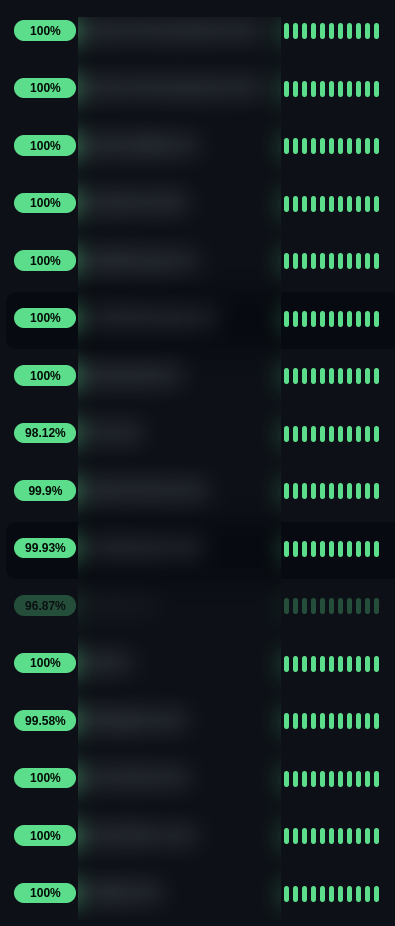
Building for actual reliability means designing the platform with redundancy from the start — not bolting it on after the fact. We’ve been doing this since 2010, and it shapes every decision about our infrastructure. Hardware fails; we plan for it. When something breaks, the architecture contains the impact. Customers at our base service level consistently see uptime of 99.5% and above.
As proof, here’s a current screenshot of our uptime monitoring, with the website names blurred out:
Expert support that understands your stack
When something breaks on a membership site, the problem usually isn’t obvious. It could be a caching rule that’s serving the wrong content to logged-in users. A query that’s slow only under load. A plugin that’s fighting with a PHP configuration. You need someone who can actually look at the problem, not someone reading from a script.
At freistilbox, support comes from the engineers who built and run the platform. They know Drupal and WordPress, and they know the membership plugins. When you report a problem, they can dig into logs, adjust cache rules, or change database settings on the spot.
If your site is business-critical and you need guaranteed response times around the clock, our Premium SLA covers 24/7 emergency support. Your site goes down at 2am the night before a launch — there’s someone to call.
Privacy and control over your data
Membership sites hold sensitive data: names, email addresses, payment details, records of what content each member has accessed. Your members trust you with that, and they expect you to handle it carefully. Your hosting provider is part of that picture.
We are an EU-based business, and freistilbox runs exclusively on servers in the EU. Member data stays in the EU, which keeps you on solid ground with GDPR. The EU’s data protection rules are among the strictest in the world, so this matters even if you and your members are based elsewhere — you’re getting a high baseline by default.
For agencies building membership sites for clients, this has moved from nice-to-have to expected. Clients ask about data residency. Their legal teams want clear answers. Being able to say “Hosted by an EU business, GDPR-compliant” closes that conversation.
Popular membership plugins for WordPress and Drupal
The checklist above applies regardless of which membership plugin you’re running. These are the most widely used options for WordPress and Drupal, and all of them will work well on freistilbox:
WordPress
- Paid Memberships Pro — a well-established plugin with a broad range of membership levels, payment gateways, and content restriction options.
- MemberPress — popular for course creators and subscription sites, with built-in LMS features.
- Restrict Content Pro — a leaner option focused on content restriction and subscription management.
- WooCommerce Memberships — the right choice if your membership is tied to a WooCommerce store.
- Ultimate Member — strong community and profile features, often used for directory or community sites.
Drupal
- Commerce License — grants access to licensed content or functionality through Drupal Commerce.
- Group — handles content access by group membership, suitable for multi-organisation or community platforms.
- Protected Pages — a simpler option for restricting access to specific pages by role or password.
Case study: Monospace Mentor
Apart from my day job, I run a DevOps and SRE learning platform called Monospace Mentor. I offer courses, a member community called The Server Room, and 1:1 mentorship sessions. The website is built on WordPress with Paid Memberships Pro, and I host it on freistilbox — not just because I’m the CTO, but because a site that loses signups during a live session is a real problem for me, the same as any other customer.
Monospace Mentor is exactly the kind of site this article is about. Members log in to access gated course content, the community space, and booking links for mentorship calls. Every page load involves permission checks — is this user a member, and which tier? Paid Memberships Pro and WordPress together generate a steady stream of database queries to answer that question. Valkey handles the object caching, which means fully assembled page components — menus, content blocks, access-controlled fragments — are stored in memory and reused rather than rebuilt from database queries on every load.
On the caching side, Varnish serves the public marketing pages and their asset files fast while correctly stepping aside for logged-in sessions. Members get their individual content; anonymous visitors get cached pages. That split happens automatically, managed at the platform level.
The part I care about most is reliability. I’m still building up the community, which means every signup matters. If someone clicks through to join during a live session or after seeing a post, I can’t afford for the site to be down or slow at that moment. Thanks to our redundant infrastructure, I simply don’t have to think about it. No maintenance windows to plan around, no performance tuning to do, no security patches to apply. That time goes into the content and the community instead.
Let’s discuss your requirements
If you’re evaluating hosting for a membership site on Drupal or WordPress, we’ll look at your specific setup and tell you honestly whether freistilbox is the right fit. Get in touch and we’ll take it from there.